
In Assassin’s Creed Black Flag Resynced, you’ve probably noticed that the movement system feels different from the original game. Instead of the classic walk-and-sprint controls, the remaster introduces a walk → jog → sprint progression that many longtime fans find less responsive.
Restore Original Walk and Sprint Controls in AC Black Flag Resynced

Fortunately, there’s a simple workaround that recreates the feel of the original Assassin’s Creed IV: Black Flag controls. While it isn’t a perfect one-to-one recreation, it removes the unwanted jogging state and makes movement feel much closer to the classic experience.
In this guide, we’ll show you exactly how to configure your controls.
How to Restore the Original Walking and Sprinting Feel
Follow these steps to eliminate the jogging mechanic and bring back the classic movement style.
Step 1: Increase Walking Speed
Open the game’s Settings menu.
Navigate to:
Settings → Controls
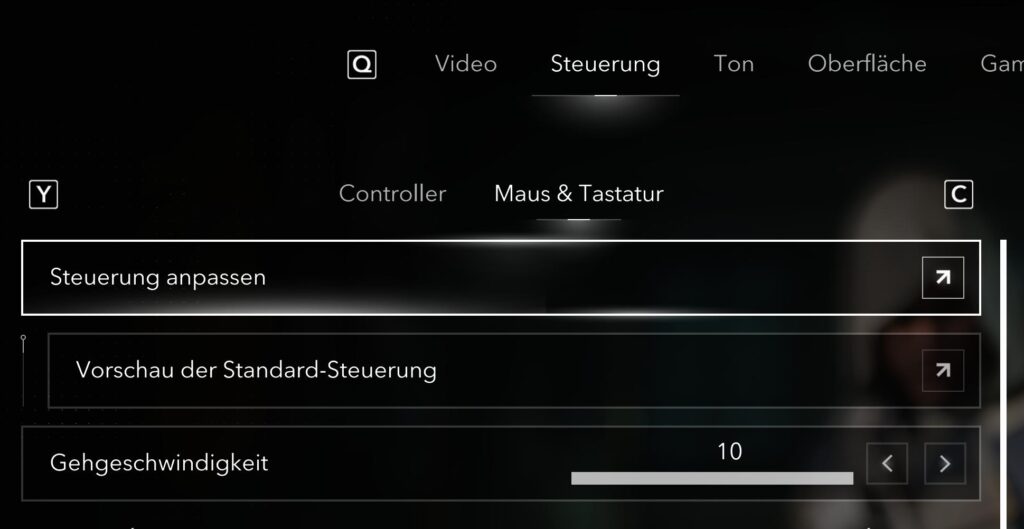
Locate the Walking Speed option and increase it to the maximum value:
- Walking Speed: 10
Setting the walking speed to its highest value helps make movement feel much closer to the original game.
Step 2: Open the Key Bindings Menu
Next, navigate to the section where you can customize your controls.
Depending on your platform, this will be the Keyboard Layout or Control Mapping menu.
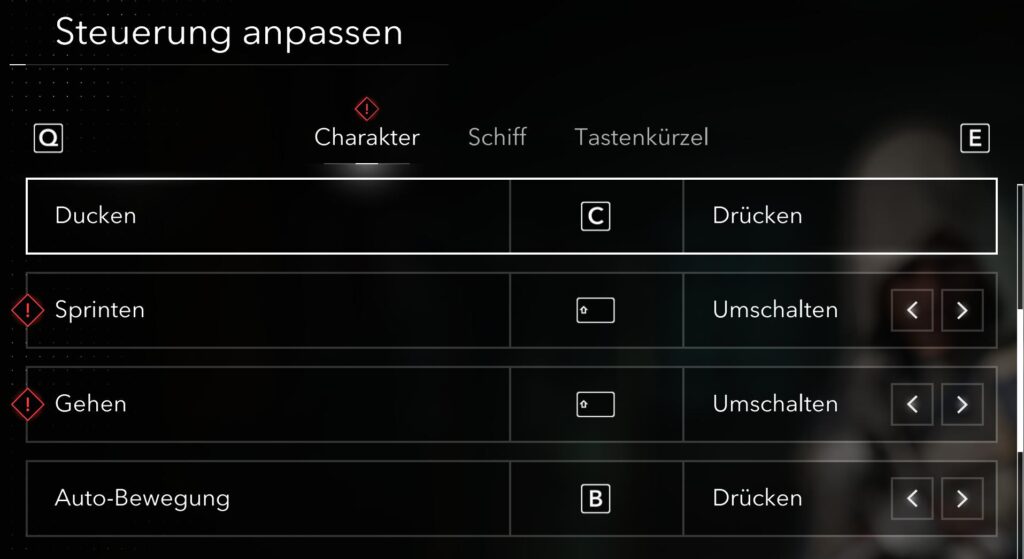
Step 3: Bind Sprint and Walk to the Same Key
Assign both of the following actions to the Shift key:
- Sprint
- Walk
Once both actions are assigned to Shift, enable Toggle Mode for both of them.
Your setup should look something like this:
| Setting | Value |
|---|---|
| Walking Speed | 10 |
| Walk Key | Shift |
| Sprint Key | Shift |
| Walk Mode | Toggle |
| Sprint Mode | Toggle |
How This Works
With these settings applied:
- The unwanted jogging state is effectively removed.
- Holding Shift still allows you to sprint when needed.
- Pressing Shift again (or stopping movement) lets you return to walking.
- Character movement becomes much closer to the original Assassin’s Creed IV experience.
Although this uses a toggle system instead of the original hold-to-sprint behavior, it’s currently one of the closest ways to recreate the classic movement.
Limitations
This workaround isn’t a perfect recreation of the original controls.
There are a few differences to keep in mind:
- You’ll be using Toggle Mode rather than the original hold-only behavior.
- Movement won’t be 100% identical to the 2013 release.
- Some animations may still differ due to changes made in Black Flag Resynced.
Despite these limitations, many players find that this setup feels significantly more natural than the default control scheme.
Why Players Prefer This Setup
The default movement system introduces an intermediate jogging speed that wasn’t present in the original game. For many returning players, this can make traversal feel slower and less responsive.
By combining the walk and sprint actions onto the same key and maximizing walking speed, you can:
- Remove the forced jogging behavior.
- Make parkour transitions feel smoother.
- Restore a movement style that’s much closer to the original Black Flag.
- Improve the overall feel of exploration on foot.
Final Thoughts
If the new walk, jog, and sprint system in Assassin’s Creed Black Flag Resynced isn’t to your liking, this simple control configuration offers one of the best available workarounds. While it isn’t an exact recreation of the original game’s movement, it successfully removes the jogging mechanic and delivers a much more familiar experience for longtime fans.
If you’re looking to make Black Flag Resynced feel as close as possible to the original classic, this is definitely a tweak worth trying.
Last Updated on July 19, 2026

An avid listener of music from a number of countries. Writing is his hobby and passion. A follower of all the latest android and PC games. Not to mention his favorite: Mobile Legends!